Track your ad campaigns
Add your ad campaigns to Ad Studio with their spend and leads, and see your cost per lead by campaign and by channel.
Ad Studio keeps a list of your ad campaigns, with what each one spent and the leads it brought in. You type these figures in yourself.
Who can do this
Owners, admins and members can add, edit, pause, resume and delete campaigns. Viewers can see the campaigns but not change them. The demo workspace is read-only.
Steps
Add a campaign
- Open Jebat and choose Ad Studio in the side menu.
- In the Campaigns card, click New Campaign.
- Fill in:
- Campaign name (required, up to 120 characters).
- Channel: WhatsApp, Facebook, Instagram or TikTok.
- Status: Active or Paused.
- Spend (RM): what the campaign has spent so far.
- Leads: how many leads it has brought in.
- Click Save.
The CPL (cost per lead) column is worked out for you: spend divided by leads. It shows — while a campaign has no leads.
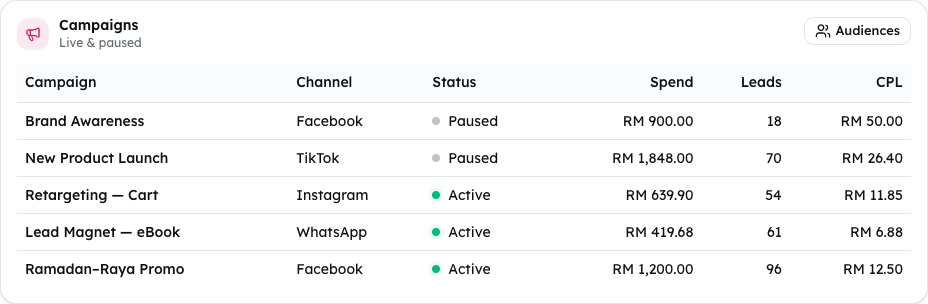
Shown from the sample workspace, where editing is switched off.
Update, pause or delete a campaign
- To change its figures, click Edit on its row, change them, and click Save.
- To mark it paused, click Pause. Click Resume to mark it active again.
- To remove it, click Delete, then Confirm?. Click Cancel to keep it.
Read the figures
- Active campaigns, Ad spend and Cost / lead at the top are counted from all your campaigns.
- Spend by channel and Leads by channel split them by channel.
Common problems
- "Reach", "Spend & leads", "Ad funnel" and "Budget used" say "Not available yet". These figures are not built for your own workspace yet. Only the demo shows sample figures in them.
- Connecting a Meta account. Ad Studio does not connect to Meta yet, so ads are not launched or synced from here. The Connect Meta, Login with Facebook and Audiences buttons do not do anything yet. Settings says "Connecting Meta is coming soon."
- "That campaign was not found." Someone else deleted it. Refresh the page.