Lekiu overview
See your team at a glance and ask Lekiu, the HR assistant, about leave, attendance and approvals.
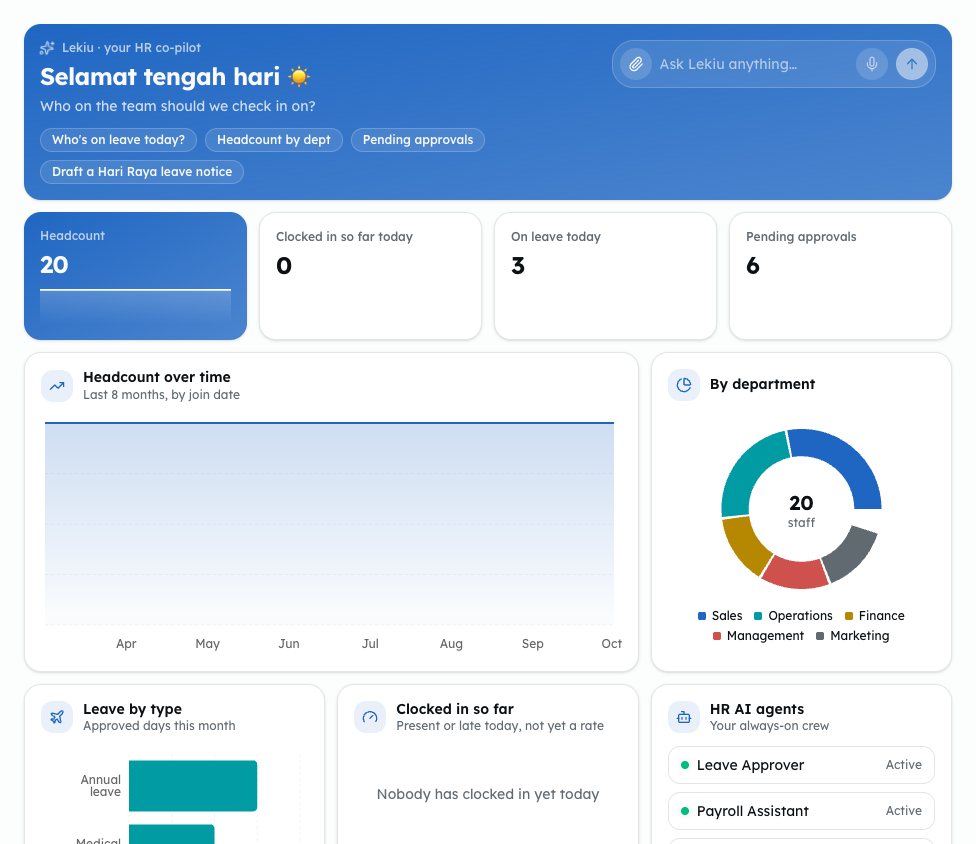
The Overview is the first screen in Lekiu. It shows your team at a glance and has a chat box where you can ask Lekiu, the HR assistant.
Who can do this
Everyone in the workspace can open the Overview. What you see depends on who you are:
- Headcount, Headcount over time, By department and Birthdays & anniversaries cover the whole team for everyone.
- Owners and admins see every card. Everyone else sees "Shown to HR admins", with no figure, on Clocked in so far today, On leave today (both the figure and the list), Leave by type, Clocked in so far and HR AI agents.
- For owners and admins the approvals card is Pending approvals. For everyone else it is Your requests: your own requests that are waiting.
Steps
-
Open Lekiu, then Overview under General.
-
To ask a question, type it in the box that says Ask Lekiu anything…, or press one of the ready questions, such as Who's on leave today? or Pending approvals.
-
Read the cards below the chat:
- Headcount, Clocked in so far today, On leave today and the approvals card.
- Headcount over time, By department, Leave by type, Clocked in so far and HR AI agents.
- On leave today, the approvals list, and Birthdays & anniversaries in the next 30 days.
Cards marked "Shown to HR admins" are filled in for owners and admins only.
Common problems
- "Your HR record isn't linked yet": your account is not linked to an employee record, so your own leave, claims and payslips are not shown. Ask an owner or admin to link it. See Link an account to an employee record.
- "No employees yet": nobody has been added. An owner or admin can add employees on the Employees screen. See Add and edit employees.
- The chat gives a sample answer: in the demo workspace, Lekiu answers with sample figures. Sign up to ask about your own team.