Reports
See how many leads came in, where from, and how many were qualified and won, and download them as a CSV file.
Reports shows your lead figures for the last 7, 30 or 90 days. It counts the leads in Jebat's lead funnel, together with the contacts that came in through your lead forms, landing pages and chatbot.
Who can do this
Everyone in the workspace can open Reports and download the leads file.
Steps
- Open Kasturi and choose Reports.
- Pick the period: Last 7 days, Last 30 days or Last 90 days.
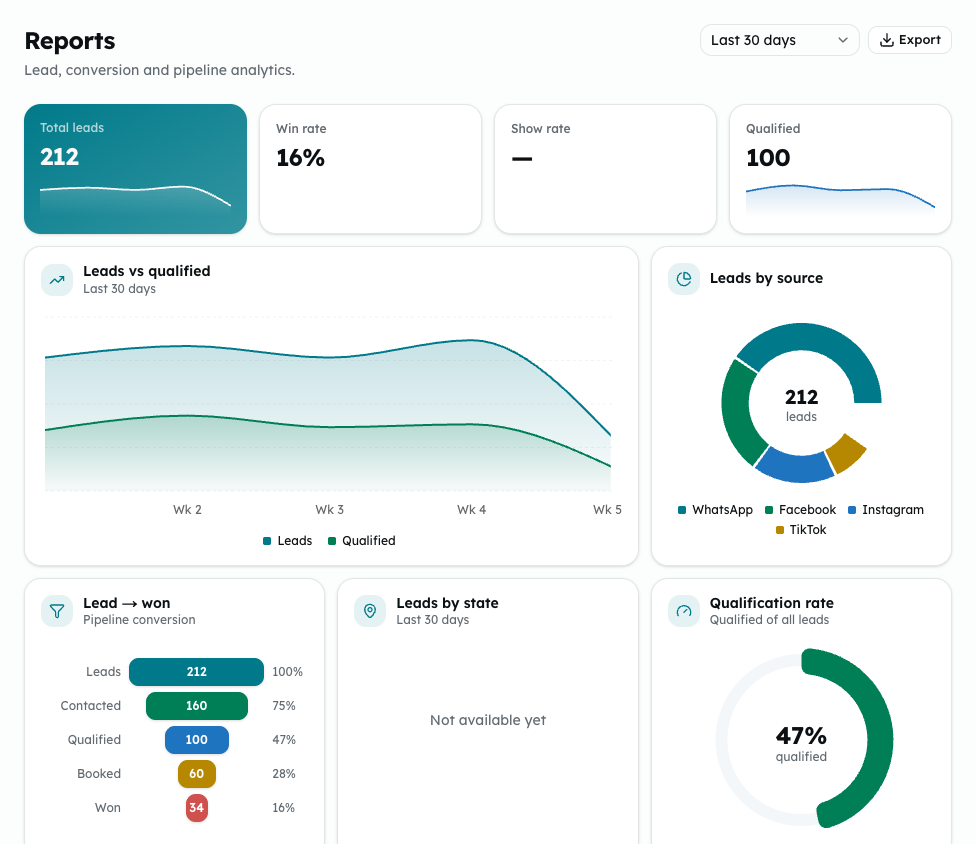
- Read the figures at the top: Total leads, Win rate, Show rate and Qualified.
- Look at the charts:
- Leads vs qualified over the period.
- Leads by source: where leads came from: WhatsApp, Facebook, Instagram, TikTok or Website.
- Lead → won: how many reached each lead stage, from Leads to Contacted, Qualified, Booked and Won.
- Qualification rate: qualified out of all leads.
- Top sources: leads and qualified leads by source.
- To download the leads for the period, click Export. The CSV file has each lead's id, name, channel, stage, source and the date it came in.
Common problems
- Leads by state shows Not available yet. It is not built yet.
- The stages here are lead stages, not your deal pipeline stages. Deal figures are on the Deals and Overview screens.
- That range is not valid.: pick one of the three periods and try again.