Lekiu settings
Set your working week, start time and grace period, and see your leave and overtime defaults.
Settings holds your workspace's HR defaults. You can change the working week here. The leave and overtime defaults are shown, but cannot be changed yet.
Who can do this
Owners and admins. The screen is hidden from everyone else. In the demo workspace the form is switched off.
Steps
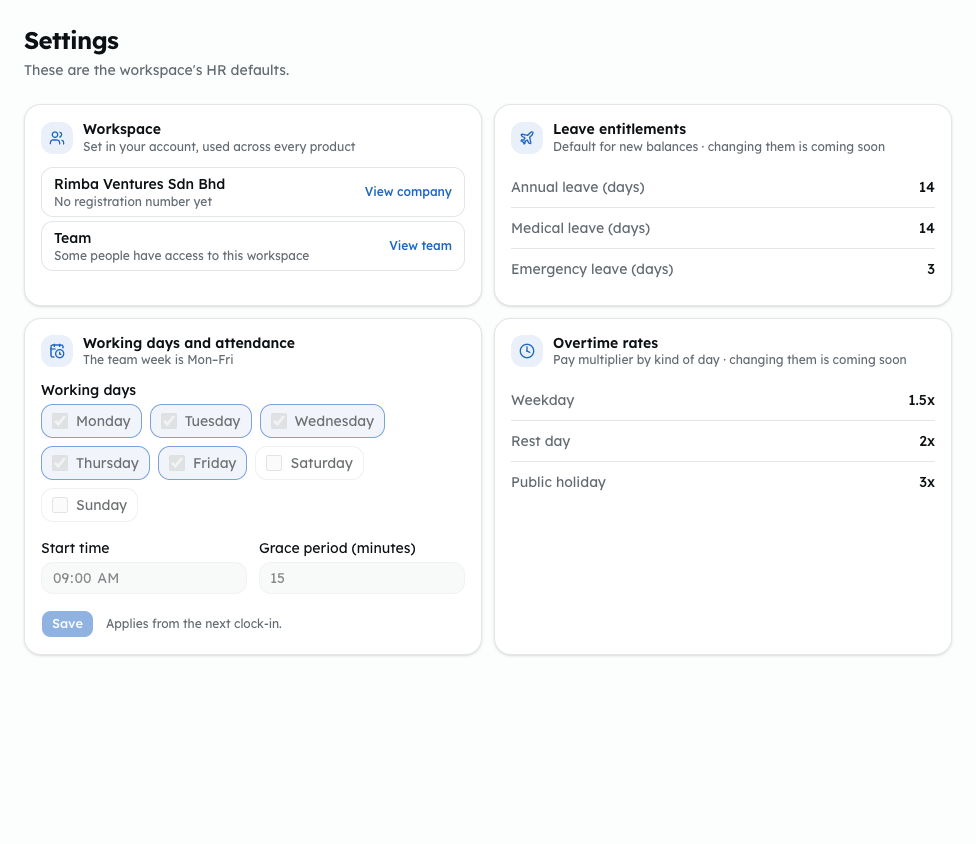
Shown from the sample workspace, where editing is switched off.
- Open Lekiu, then Settings under Configuration.
- The Workspace card shows your company and team. Use Edit company or Manage team to change them in your account.
- In Working days and attendance:
- Tick the Working days.
- Set the Start time.
- Set the Grace period (minutes), from 0 to 240.
- Click Save. The new values apply from the next clock-in.
Leave entitlements shows the default days for new balances: annual, medical and emergency leave. Overtime rates shows the pay multiplier for a weekday, a rest day and a public holiday. Changing these is coming soon.
To change one employee's leave entitlement for this year, edit the employee. See Add and edit employees.
Common problems
- "Choose at least one working day."
- "Enter the grace period as whole minutes, from 0 to 240."
- "This page is for owners and admins of the workspace." You are not an owner or admin.