Kasturi overview
See your pipeline value, win rate, deals closing soon and open follow-ups on one screen, and ask Kasturi about them.
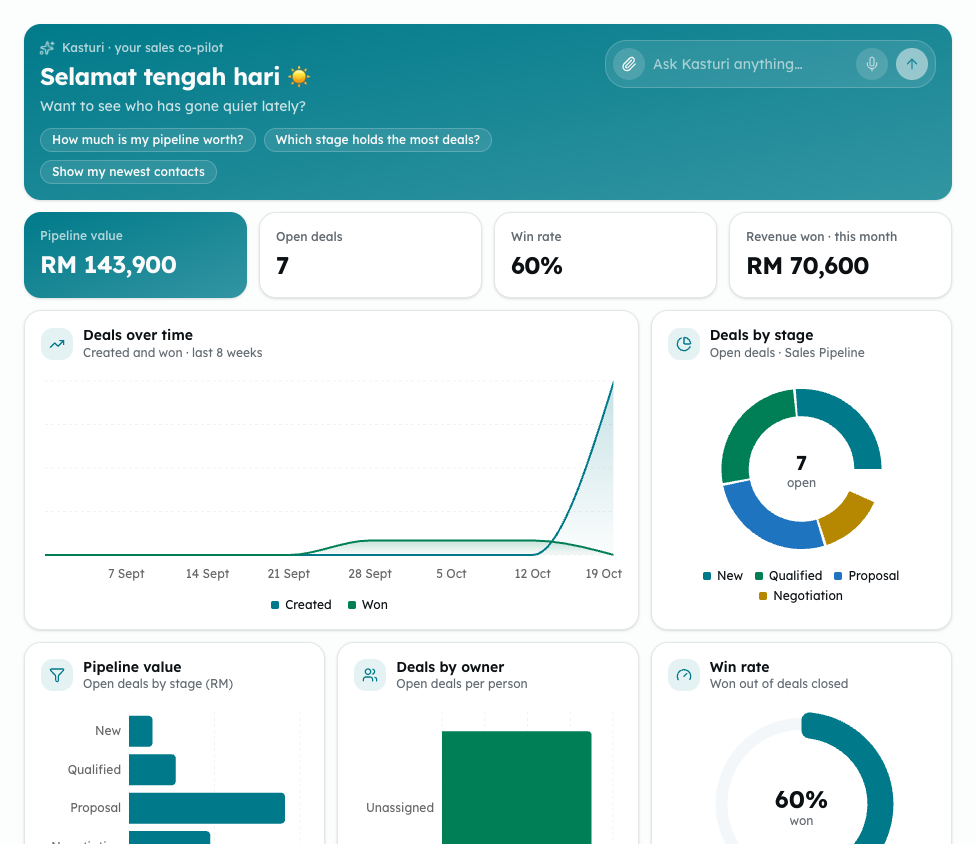
The Overview is Kasturi's home screen. It shows your sales figures, worked out from your own deals, contacts and follow-ups, and a chat box to ask Kasturi about them.
Who can do this
Everyone in the workspace can open the Overview. The figures come from the workspace's own data, so everyone sees the same numbers.
Steps
- Open Kasturi and choose Overview.
- Read the four figures at the top:
- Pipeline value: the value of every open deal, in ringgit.
- Open deals: how many deals are still open.
- Win rate: deals won out of deals closed (won and lost).
- Revenue won · this month: the value of deals won this calendar month.
- Look at the charts below them:
- Deals over time shows deals created and won in each of the last 8 weeks.
- Deals by stage and Pipeline value show your open deals in each stage of your default pipeline.
- Deals by owner shows how many open deals each person has.
- Win rate shows the share of closed deals that were won, as a dial.
- Check Deals closing soon. It lists up to five open deals whose expected close date is in the next 7 days.
- Check Recent activity. It shows the latest deals added, won or lost, contacts added, logged calls and messages, and follow-ups done.
- Check Follow-ups. It lists open follow-ups, soonest first. An overdue one shows Overdue in red.
- To ask a question, type it in the Kasturi chat box at the top, or pick one of the ready questions, such as How much is my pipeline worth?
Common problems
- Couldn't load your dashboard — please refresh: the figures could not be read. Reload the page.
- No deals yet: the workspace has no deals. Add one on the Deals screen.
- No deal has closed yet: the win rate needs at least one deal marked won or lost.
- A deal moving from one stage to another is not shown in Recent activity. Only adding, winning and losing a deal are.
- In the demo workspace, the chat gives a sample answer. Sign up to ask about your own data.
- Each person has 3 free questions a week across all the assistants, unless your workspace adds its own OpenRouter key.