Track leads through the funnel
Add leads to Jebat, move them from Lead to Won, and see how many reach each stage and which channels they come from.
The Lead Funnel lists your leads, newest first, and shows how far each one has got: Lead, Contacted, Qualified, Booked or Won.
Who can do this
Owners, admins and members can add, edit, move and delete leads. Viewers can see the leads but not change them. The demo workspace is read-only.
Where leads come from
- Leads you add here yourself, or that you ask Jebat to add for you.
- People who come in through a lead form, a landing page or the chatbot. They are kept as Kasturi contacts and show here with the channel Website. Owners, admins and members also see an Open in Kasturi button on their row. Their stage follows their status in Kasturi, so you change it there.
Steps
Add a lead
- Open Jebat and choose Lead Funnel in the side menu.
- In the Leads card, click New Lead.
- Fill in:
- Name (required, up to 120 characters).
- Channel: WhatsApp, Facebook, Instagram or TikTok.
- Stage: where the lead is now. It starts at Lead.
- Source: optional, for example the campaign or event it came from, up to 120 characters.
- Click Save.
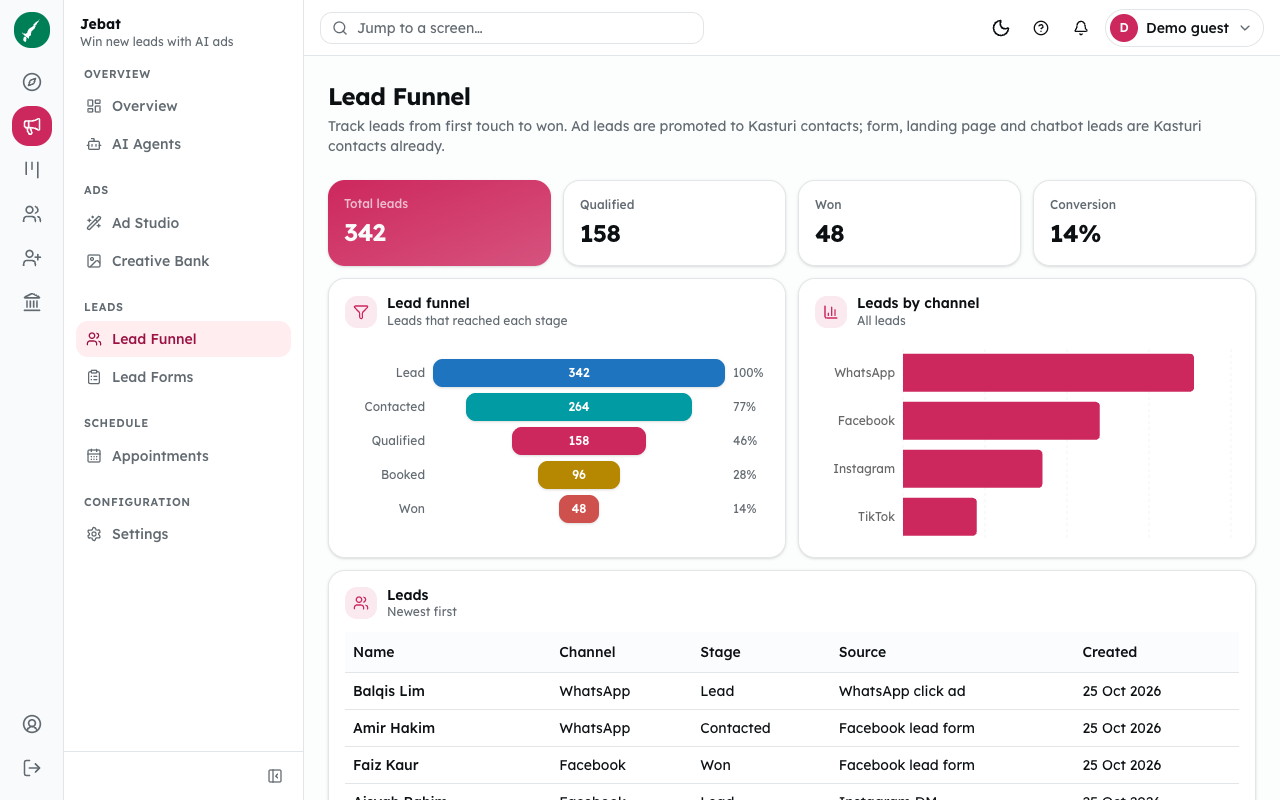
Shown from the sample workspace, where editing is switched off.
Move a lead to another stage
In the lead's row, pick the new stage from the Stage list. It saves straight away.
Edit or delete a lead
- Click Edit, change the details, and click Save.
- Click Delete, then Confirm?. Click Cancel to keep the lead.
Read the figures
- Total leads counts every lead.
- Qualified and Won count the leads that have reached that stage or gone further.
- Conversion is the share of all leads that reached Won.
- Lead funnel shows how many leads reached each stage.
- Leads by channel shows where your leads came from.
Common problems
- A lead has no Stage list, only "Open in Kasturi". It came in through a lead form, a landing page or the chatbot, and lives in Kasturi. Click Open in Kasturi and change its status there. (Viewers see neither the Stage list nor the button, only the stage.)
- "That lead was not found." Someone else deleted it. Refresh the page.