Lekiu calendar
See leave, time-off, public holidays, training, birthdays and work anniversaries on a month view.
The Calendar puts the team's dates on one month view: leave, time-off, public holidays, training, birthdays and work anniversaries. It only shows information.
Who can do this
Everyone in the workspace. What you see depends on who you are:
- Owners and admins see everyone's leave, holidays and milestones.
- Managers see their team's dates and the company's.
- Everyone else sees their own dates and the company's, and only the training they are enrolled in.
Steps
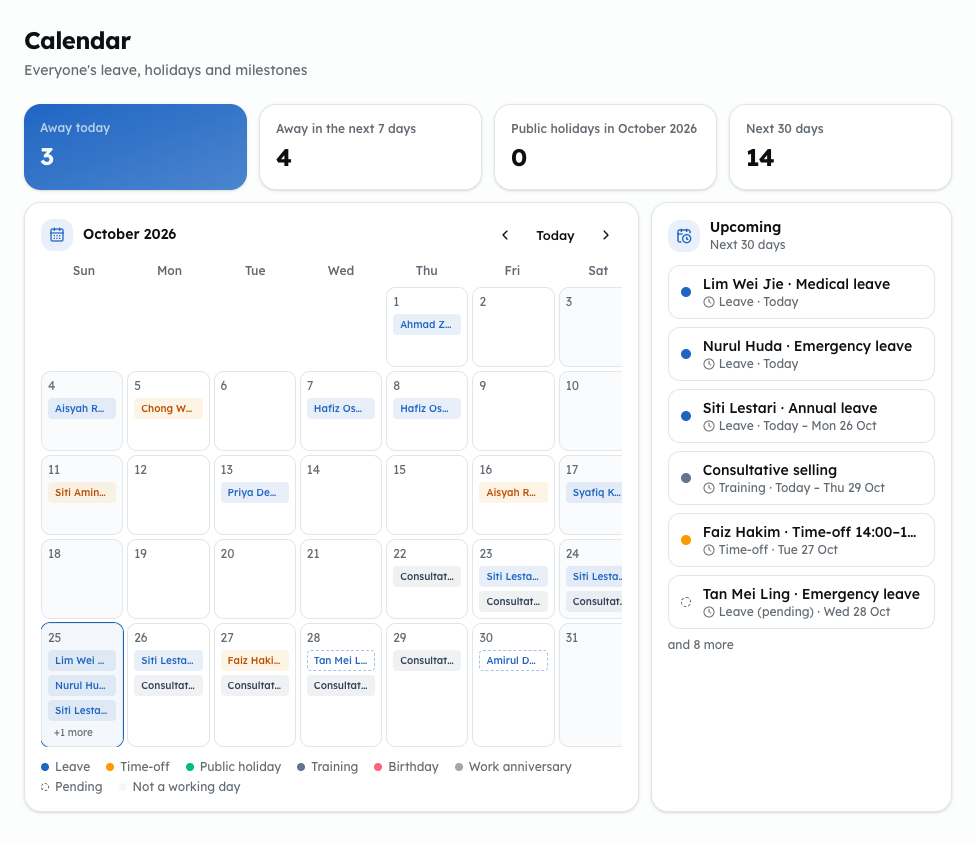
- Open Lekiu, then Calendar under General.
- Read Away today, Away in the next 7 days, the public holidays in the month and Next 30 days.
- Use the arrows to move a month back or forward. Click Today to come back to this month.
- Each kind of date has its own colour. A pending request is drawn with a dashed outline. Click an entry to open it.
- Upcoming lists what is coming in the next 30 days.