Run payroll
Create a monthly payroll draft, check and adjust each payslip, then mark the run as paid.
On Payroll, owners and admins run payroll month by month. A run starts as a draft that employees cannot see. When you mark it as paid, each employee sees their payslip on My Payslips.
Marking a run as paid only records it in OpenKuasa. It does not move any money, make a bank file, or submit anything to EPF, SOCSO, EIS or LHDN. You pay and submit those yourself. It also posts nothing to Bendahara, so record the salaries there separately.
Who can do this
Owners and admins. The screen is hidden from everyone else, and shows "This page is for owners and admins of the workspace." if opened. In the demo workspace the screen can be read but nothing can be run or changed.
Before you start
Each employee needs a Monthly base salary (RM) on their record. Someone with no base salary is left out of the run, with the reason "No base salary recorded". See Add and edit employees.
Steps
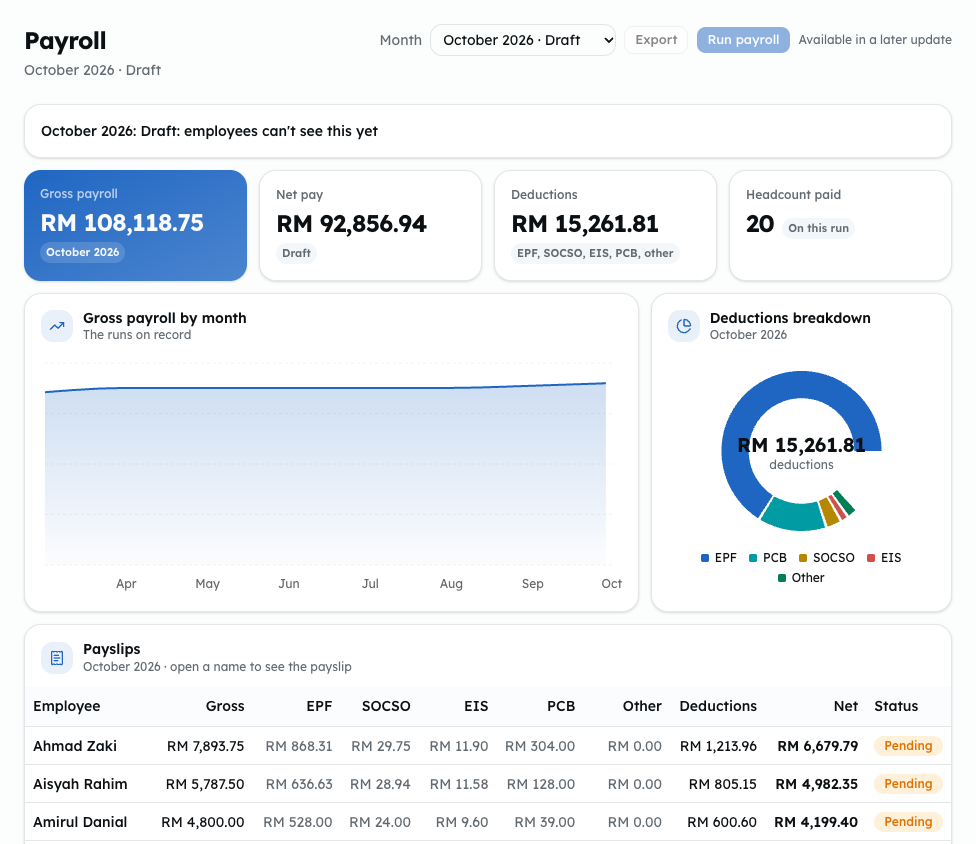
This screenshot is from the demo workspace, where Run payroll is switched off and shows "Available in a later update". In your own workspace Run payroll opens the run dialog, unless a draft run is blocking the next month or there is no month left to run.
Create a draft
- Open Lekiu, then Payroll under Payroll.
- Click Run payroll.
- For your first run, pick the Month. The first run can be any month up to this one. Choose it with care: after that, months follow one another and none can be skipped, so the dialog shows the next month.
- Click Create draft. Nobody is paid and employees can't see it yet.
The screen shows "Draft: employees can't see this yet". It also notes overtime claims from earlier months that the run picked up, and active employees who are not on the run.
Check and adjust payslips
- In Payslips, click an employee's name to open their payslip.
- To add pay or a deduction, click Add line, choose Earning (adds to gross) or Deduction (comes off net), and, for an earning, say what kind it is: ordinary pay, a bonus, a travel allowance, a service charge or a gratuity. The form says what each one counts towards. Type a name and the amount, and click Save line. Lines you added can be edited or removed. Lines added by the system cannot: overtime ("Overtime," with the date and hours), unpaid leave ("Unpaid leave," with the days) and the unpaid days before a new joiner started ("Joined" with the date).
- Check EPF, SOCSO, EIS and PCB. The payslip says: "Proposed figures. Check them before marking the run as paid." Know how they are filled in:
- EPF, SOCSO and EIS are simple estimates of the employee's share, worked out from the wages each scheme counts (see What counts as wages under "Before you rely on these figures"), so an ordinary earning line you add raises all three. Overtime from approved claims (the "Overtime" lines the system adds) raises SOCSO and EIS but not EPF. The rates depend on the employee's age and Citizenship (for EPF and EIS). Overtime you add yourself with Add line is counted for EPF like any other earning, so set the EPF figure yourself if a line you added is overtime. From the month after an employee turns 60, all three are zero; EIS is also zero for anyone under 18. They are not the official contribution tables, so check each one. The payslip also shows the employer's shares under Employer contributions.
- PCB is not worked out. It is copied from the employee's last paid payslip, or RM 0.00 if there is none. A first run and a new joiner get RM 0.00, and PCB does not change when salary, overtime or other pay changes. Enter the correct PCB for each employee every month.
- To use your own amount, type it and click Save. The figure is then marked set by HR and stays fixed, even when you click Recalculate. Click Reset to go back to the proposed amount. After changing salary, overtime or lines, click Reset or check the figures you set again.
- To take someone off this draft, click Remove payslip, then Confirm. Recalculate would bring it back.
Click Recalculate after changing salaries or overtime. It adds payslips for anyone new.
Mark the run as paid
- Click Mark as paid, then Confirm. Employees can now see their payslips.
To change a paid run, click Undo paid, then Confirm. The run goes back to a draft, its payslips go back to pending, and employees no longer see them. Only the newest run can be undone: if a later month already has a run, delete that run first. Only a draft can be deleted, so if that later run is paid, click Undo paid on it first, then Delete draft. To throw a draft away, click Delete draft, then Confirm.
Be careful when undoing and deleting later runs: deleting a run deletes its payslips and their lines. Every line typed in and every EPF, SOCSO, EIS or PCB figure marked set by HR in those months is lost. When you run those months again, PCB is copied afresh from the employee's last paid payslip.
Use the Month list at the top to open an earlier run. Export is a disabled button that says "Available in a later update".
Before you rely on these figures
Lekiu's proposed figures are a starting point, not the official amounts. Where they differ from the official rules, type the correct amount so it is marked set by HR. The rules below are as they stand at the time of writing; check KWSP, PERKESO and LHDN for the current ones.
- Age. Lekiu reads each employee's age from the Date of birth on their record, or, if that is empty, from a Malaysian IC number in NRIC / passport no. (its first six digits are the date of birth). With neither, it can't tell their age and keeps the full employee share, so fill one of them in. A birthday changes the figures from the following month: someone who turns 60 in March still pays in March and stops in April.
- EPF. Lekiu takes a flat percentage of EPF wages as an estimate, leaving the system's overtime lines out. KWSP sets the amounts by wage band in the Third Schedule of the EPF Act. The rate follows the employee's Citizenship (for EPF and EIS):
- Malaysian citizen: 11% below 60. None from 60 (the employer still pays 4%).
- Permanent resident, or Non-citizen, EPF member since before 1 August 1998: 11% below 60, then 5.5%.
- Non-citizen: 2% at any age. This became mandatory with October 2025 wages, so for an earlier month type the figure in yourself.
- Not recorded is worked out as a Malaysian citizen.
- No one pays employee EPF from age 75, KWSP's maximum age.
- SOCSO. Lekiu's figure is an estimate. Use PERKESO's contribution table. Staff aged 60 and over pay no employee SOCSO, and Lekiu leaves their figure at zero.
- EIS. Lekiu's figure is an estimate. Use the official EIS contribution table. EIS covers Malaysian citizens and permanent residents aged 18 to 60, so Lekiu leaves the figure at zero under 18, from 60, and for non-citizens. Someone who was 57 or older when they first joined and had never contributed before is exempt too; Lekiu can't tell that from the record, so set their EIS to zero yourself.
- What counts as wages. Each earning line you add says what kind it is, and that decides which of the three schemes takes its amount:
- Ordinary pay counts towards EPF, SOCSO and EIS wages.
- Bonus counts towards EPF wages only, not SOCSO or EIS.
- Service charge counts towards SOCSO and EIS wages only, not EPF.
- Travel allowance and gratuity are not EPF, SOCSO or EIS wages. Overtime the system adds counts towards SOCSO and EIS but not EPF. An overtime line you add yourself with Add line is ordinary pay, so set the EPF figure yourself for that month. A line added before this choice existed counts as ordinary pay.
- Employer shares. The payslip shows the employer's EPF, SOCSO and EIS shares under Employer contributions, and the run shows their total and the run's cost when every payslip in it has them recorded. They are paid on top of gross pay: none of it comes off what the employee receives. Lekiu works them out from the same rules as the employee's share, and the rates depend on the employee's Citizenship (for EPF and EIS), their age and the wage band:
- EPF: 13% of wages up to RM 5,000 and 12% above it below 60; 4% from 60. A permanent resident, or a non-citizen who joined before 1 August 1998, pays 6.5% then 6% from 60. Any other non-citizen pays 2% at any age.
- SOCSO: 1.75% below 60, and 1.25% from 60 in the second category, which the employer pays alone. Foreign workers are in the Invalidity Scheme too, so they pay it at any age.
- EIS: 0.2%, for Malaysian citizens and permanent residents aged 18 to 60 only.
- The employer's SOCSO and EIS shares are estimates, worked out as a rate of wages like the employee's, rounded to five sen and held at PERKESO's top band: RM 104.15 below 60, RM 74.40 from 60, and RM 11.90 for EIS. PERKESO charges a fixed amount for each wage band rather than a rate, so below the top band a figure can be a few sen off. Check PERKESO's contribution table. A payslip paid before Lekiu worked these out says Not recorded rather than showing zero.
- Check KWSP and PERKESO before you pay. A voluntary higher EPF rate is not handled: type the difference in yourself.
- PCB. Lekiu does not calculate PCB. Work it out each month with LHDN's PCB calculator or e-CP39 and enter it on each payslip. As the employer, you are responsible for deducting the correct amount.
- Unpaid leave and new joiners. Both follow section 18A of the Employment Act (in force since 1 January 2023), which covers a month not worked in full: monthly wages × eligible days ÷ days in the wage period. For a monthly-paid employee the wage period is the calendar month, so Lekiu counts everything in calendar days:
- New joiner: paid for the days from the join date to the month end, weekends and public holidays included.
- Unpaid leave: every calendar day of approved unpaid leave is unpaid, including a weekend that falls inside it. Leave from Friday to Monday is 4 days, and a whole month of unpaid leave pays nothing. A public holiday inside the leave stays paid. Leave dated before the join date isn't counted twice.
- Rounding: the pay is worked out once and rounded once, and the payslip shows it as one or two lines: "Joined 16 Mar 2026 (16 of 31 days)" and "Unpaid leave, 2 of 31 days".
- Check the weekend rule: the Act doesn't say how rest days inside unpaid leave are counted. The leave request itself counts only working days, so it can show 2 days where payroll counts 4. If your company counts only the working days, give the difference back with Add line as an earning.
- Leaver: enter the last day of employment on the employee's record. That month pays the days from the 1st (or the join date) to that day, and the payslip shows it as "Left 20 Mar 2026 (20 of 31 days)". Unpaid leave dated after the last day isn't counted, and overtime worked after it isn't paid. A month entirely after the last day gets no payslip, with one exception: overtime worked on or before the last day but approved after that month's run is paid on a payslip of its own in the next run, with no basic pay and no "Left" line, only the overtime. If you set the last day after a draft run was made and it falls before the run's month, Recalculate removes that person's payslip and lists them as left out, unless you added a line or typed in an EPF, SOCSO, EIS or PCB amount yourself: then the payslip stays, with no basic pay, so remove it if you don't want it. Setting the last day doesn't change the employee's status: set that to Inactive when the paperwork is done, after that month's run. An Inactive employee gets no payslip at all, so late-approved overtime is only paid while they are still Active.
Common problems
- "Mark … as paid or delete it before running the next month." Only one draft at a time.
- "A payslip's net pay is below zero. Fix it before marking the run as paid."
- "An overtime claim on this run has changed. Recalculate first."
- "Run payroll for the month after the latest run first." Months cannot be skipped.
- "That line is worked out by the system and can't be changed."
- "Every month up to now already has a payroll run." There is no month left to run yet.
- "A later month already has a payroll run. Delete that run first." You can only undo paid on the newest run.