Calendar
See your appointments, follow-ups and expected deal closes on one month calendar in Kasturi.
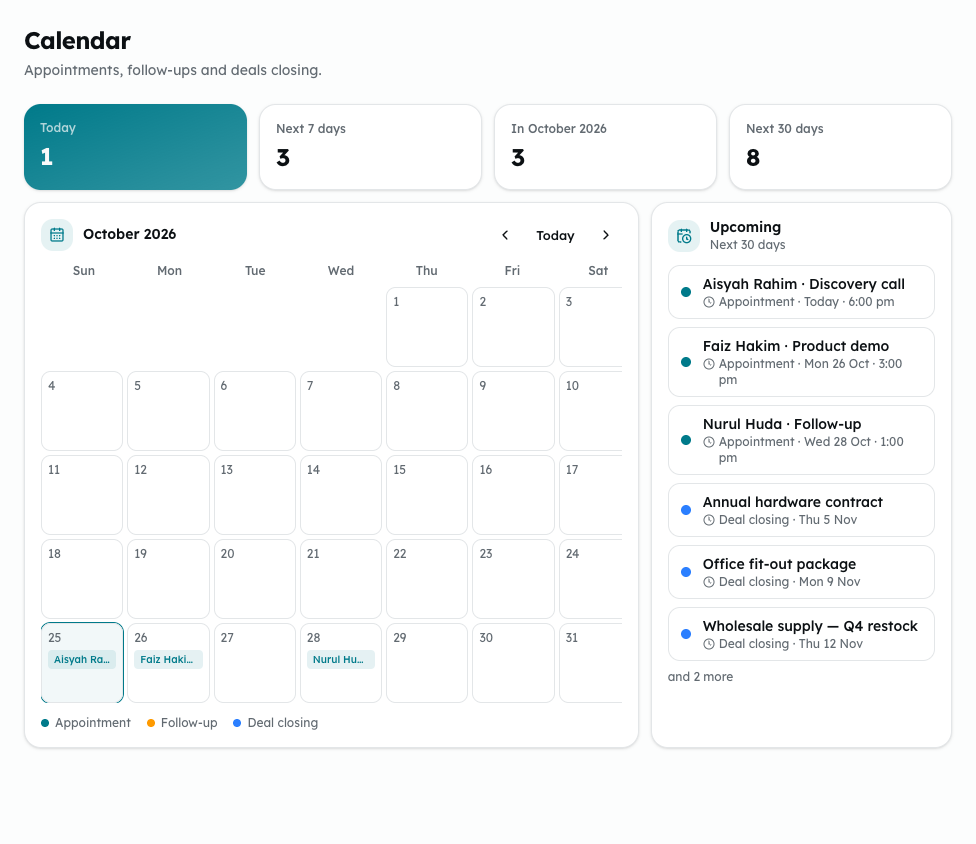
The Calendar puts your appointments, open follow-ups and expected deal closes on one month grid. It shows what is already in Kasturi; you add things on their own screens.
Who can do this
Everyone in the workspace can open the Calendar.
Steps
- Open Kasturi and choose Calendar.
- Read the figures at the top: Today, Next 7 days, the month on show, and Next 30 days.
- Move between months with the previous and next buttons. Click Today to come back to this month.
- Each day shows up to three entries, and +N more if there are others. The colours are:
- Appointment: appointments that are not cancelled, with the time.
- Follow-up: open follow-ups that have a due date.
- Deal closing: open deals on their expected close date.
- Click an entry to go to its screen: Appointments, Contacts or Deals.
- Upcoming lists the next entries in the coming 30 days.
Common problems
- A follow-up with no due date is not on the Calendar. Add a due date to it on the Contacts screen.
- A deal with no expected close date, or one that is won or lost, is not on the Calendar.
- Dates and times are in Kuala Lumpur time.
- Couldn't load your calendar — please refresh: reload the page.