Billings
See what you have billed, what is still owed and what is overdue, from your Bendahara invoices, inside Kasturi.
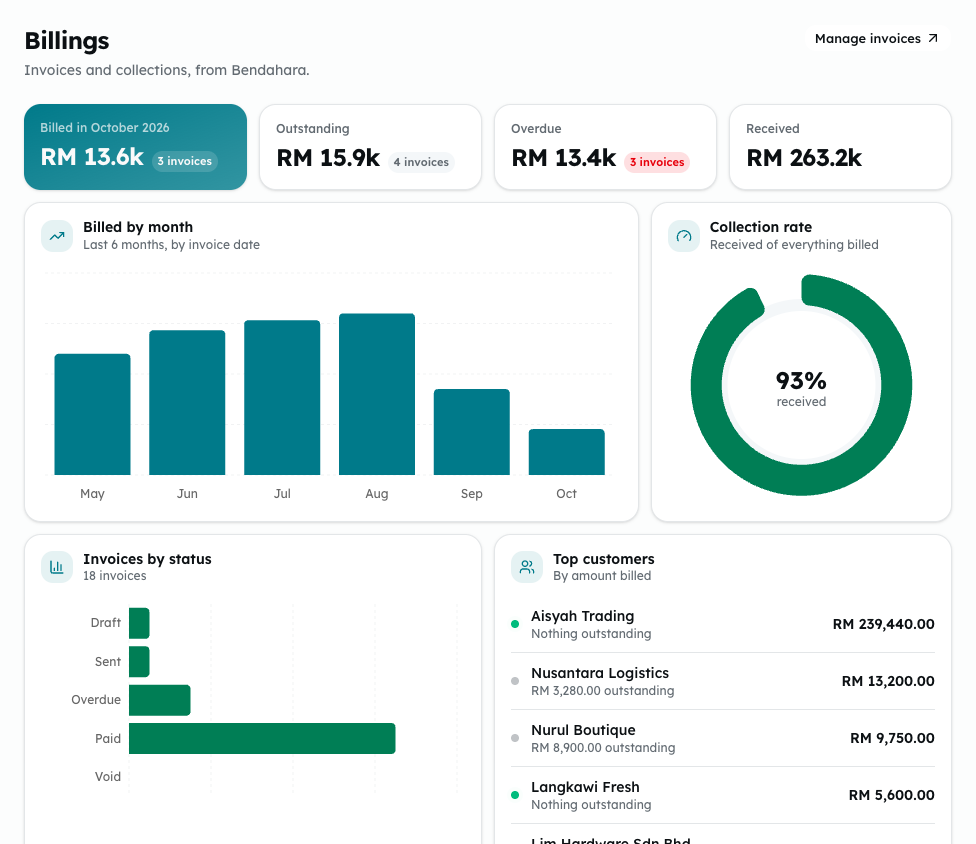
Billings shows your sales invoices and collections inside Kasturi. The invoices come from Bendahara. Nothing is changed here: invoices are created and edited in Bendahara.
Who can do this
Everyone in the workspace can open Billings. Creating and changing invoices happens in Bendahara, under its own rules.
Steps
- Open Kasturi and choose Billings.
- Read the figures at the top:
- Billed in this month: invoices dated this month that have been issued.
- Outstanding: what is still owed on sent and overdue invoices.
- Overdue: the part of what is owed that is past its due date.
- Received: money received against issued invoices.
- Look at the charts: Billed by month, Collection rate (received out of everything billed), Invoices by status and Top customers.
- Check Recent invoices for the newest invoices, with the customer, the linked deal, the dates, the total, the balance and the status: Draft, Sent, Overdue, Paid or Void.
- To create or change an invoice, click Manage invoices or View all. They open Bendahara's Invoices screen.
Link an invoice to a deal
The Deal column shows the deal an invoice belongs to. To link one, edit the deal on the Deals screen and tick it under Invoices.
Common problems
- No invoices yet. Create one on Bendahara's Invoices screen.: the workspace has no invoices.
- No invoices posted yet: invoices that are still drafts do not count as billed.
- Each invoice's total and balance are in its own currency. Every sum on the page is in ringgit.
- Couldn't load your invoices — please refresh: reload the page.